The Indie Hacker's Tool Stack in 2026: What You Actually Need
If you're building a product solo in 2026, managing too many tools can slow you down. The key is to simplify your stack and focus on tools that help you ship faster without burning through your budget. Here's what you need:
- Hosting & Backend: Use Vercel (free or $20/month) for frontend, paired with Supabase or Railway for backend. Both offer generous free tiers for small projects.
- Payments: Lemon Squeezy handles global taxes but has higher fees. Stripe is cheaper but requires manual tax compliance.
- Frontend: Next.js (v15/16) with Tailwind CSS and shadcn/ui for UI components. These are free and AI-friendly.
- AI Tools: Cursor ($20/month) and OpenAI Codex (included in ChatGPT Plus at $20/month) streamline coding tasks. Use v0 for quick UI prototyping.
- Analytics: Plausible ($9/month) for privacy-first stats or PostHog for an all-in-one analytics solution with a free tier.
- Monitoring: Uptrack or UptimeSignal ($15/month) to avoid false alerts and ensure uptime.
- Project Management: Linear ($10/user/month) for fast task tracking or Notion ($10/month) for combined task and document management.
- Unified Dashboard: Bax ($12.99/month) consolidates tools like GitHub, Stripe, and uptime monitoring to save time.
Quick Tip: Start with free tiers and keep costs under $25/month until you validate your idea. Focus on building and shipping instead of overloading on tools.
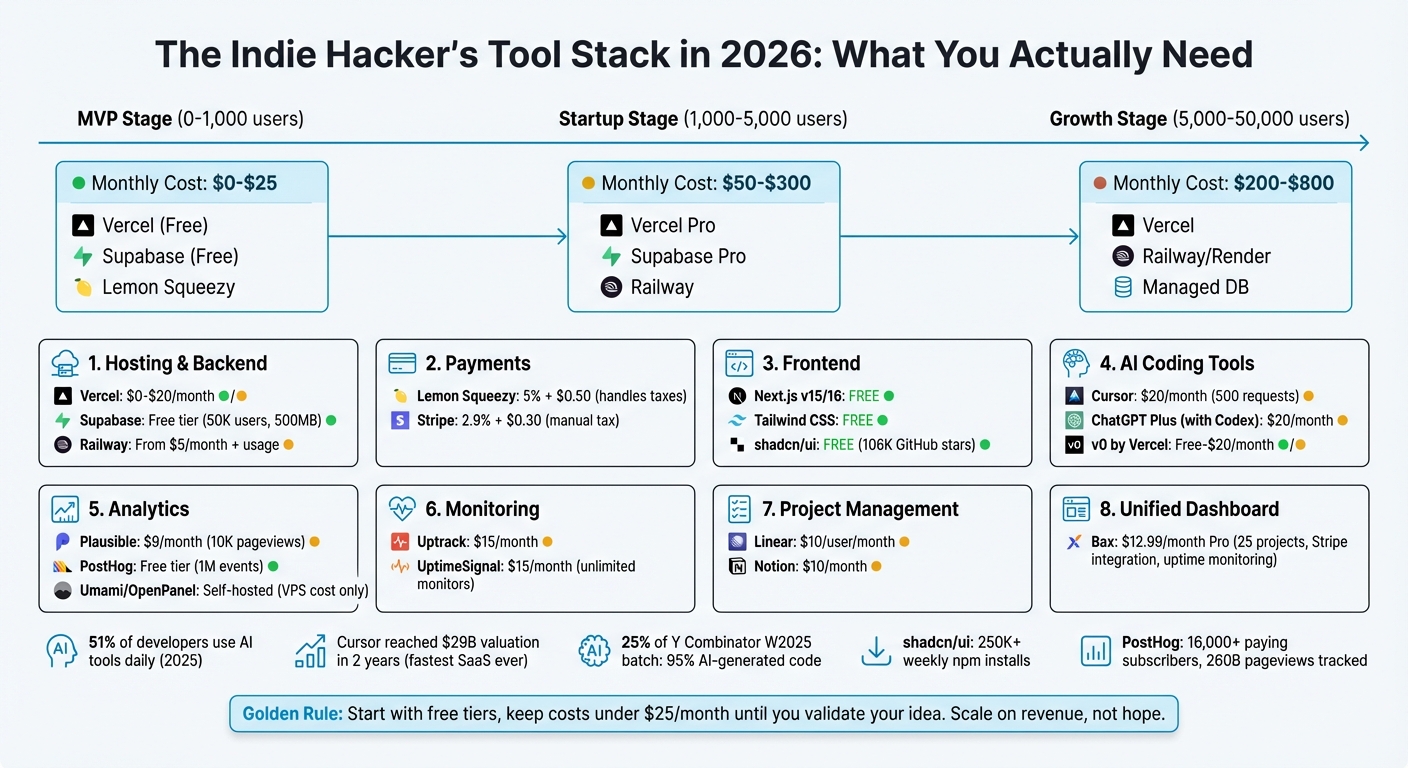
Indie Hacker Tool Stack 2026: Complete Cost Breakdown by Growth Stage
🚀 tech stack for indie hackers (solo developers)
sbb-itb-5b9029c
Hosting, Backend, and Payment Tools
The tools you choose for hosting, backend, and payment processing shape how smoothly you can scale your SaaS. The right setup lets you focus on building and shipping, without getting bogged down in server maintenance or tax compliance.
Hosting and Deployment
For Next.js projects in 2026, Vercel remains the top choice. Its edge functions handle 99.37% of requests without cold starts, and instant preview deployments make iterating on your app a breeze [10]. The Pro plan is priced at $20 per user per month [9].
If you need a full-stack solution, Railway simplifies deployment. It supports databases like Postgres, Redis, MySQL, and MongoDB, with usage-based pricing starting at $5 per month, plus the cost of resources used [9][10]. Another great option is Supabase, which offers managed Postgres, authentication, and real-time features. Its free tier is generous, covering up to 50,000 monthly active users and 500MB of database storage - perfect for most MVPs [2].
"Railway is what Heroku should have become. It handles full-stack deployment with built-in databases and environment management that feels effortless." – DesignRevision Admin [9]
Many indie SaaS developers use a hybrid setup: Vercel for the frontend, paired with Railway or Supabase for the backend [9][10]. This approach balances ease of use with flexibility, while avoiding vendor lock-in.
Payment Processing
Once your app is deployed, handling payments is the next big hurdle. Lemon Squeezy is a favorite for indie developers, acting as the Merchant of Record. It takes care of global tax compliance, VAT collection, and sales tax remittance - tasks that can be a nightmare to manage on your own [6][1]. However, Lemon Squeezy charges higher fees (5% + $0.50 per transaction) compared to Stripe’s 2.9% + $0.30 [13][3].
"Supabase + Lemon Squeezy is the indie developer's friend. Supabase handles your backend without server management. Lemon Squeezy handles payments without tax accounting." – buildmvpfast.com [13]
For developers selling primarily in the U.S. or managing their own tax registrations, Stripe offers lower transaction fees and more control. But if your focus is on global sales, Lemon Squeezy’s automated tax handling can save you significant time and effort [13][3].
Pricing and Free Tiers
When you're just starting out, keeping costs low is critical. At the MVP stage (0–1,000 users), you can keep infrastructure expenses between $0 and $25 per month by using Vercel’s free Hobby tier, Supabase’s free plan, and Lemon Squeezy’s transaction-only pricing [4]. As your user base grows to 1,000–5,000 users, expect to spend $50 to $300 monthly as you upgrade to Vercel Pro and Supabase Pro [13].
For larger apps with 10,000–100,000 users, hosting costs typically range from $1,000 to $5,000 per month [9]. At this stage, many developers switch to self-hosted solutions like Coolify on VPS providers (e.g., Hetzner or DigitalOcean), which can save $800–$1,100 annually for a typical five-app setup [11][12]. To avoid surprise expenses, set spending limits on platforms like Vercel and Railway [9][10]. Keeping costs predictable allows you to focus on what matters most - building your product.
| Stage | Monthly Active Users | Estimated Cost | Recommended Stack |
|---|---|---|---|
| MVP | 0 - 1,000 | $0 - $25 | Vercel (Free) + Supabase (Free) + Lemon Squeezy |
| Startup | 1,000 - 5,000 | $50 - $300 | Vercel Pro + Supabase Pro + Railway |
| Growth | 5,000 - 50,000 | $200 - $800 | Vercel + Railway/Render + Managed DB |
Frontend and UI Tools
By 2026, modern UI frameworks and libraries have made it easier than ever to create polished, professional interfaces. These tools not only speed up development but also ensure your code remains maintainable and works seamlessly with AI-assisted workflows. They simplify the process while keeping it adaptable and efficient.
Frameworks and Component Libraries
Next.js (v15/16) continues to dominate as the top framework for indie developers. Its App Router, Server Components, and effortless deployment on Vercel make it a favorite choice [14]. When it comes to UI components, pairing shadcn/ui with Tailwind CSS has become the standard. Unlike traditional libraries, shadcn/ui allows you to directly copy component code into your project. This approach gives you complete control over your codebase while making it easier for AI tools to read, modify, and optimize your UI [16]. By 2026, shadcn/ui has reached over 106k GitHub stars and sees more than 250k weekly npm installs [16].
This open-source setup not only ensures vendor independence but also keeps your code accessible for AI tools to customize without barriers. Since the code resides in your repository, AI-assisted development becomes smoother and more efficient [19].
AI-Assisted Coding
AI tools are reshaping the way indie developers approach coding. Cursor is a standout option for solo projects, offering a "Composer" feature that lets you refactor entire workflows across multiple files in one go [18]. The Pro plan is priced at $20 per month for 500 fast requests [16][17]. If you're already subscribed to ChatGPT Plus ($20/month), OpenAI Codex is included. Notably, Codex has achieved the highest score - 56.8% - on the SWE-Bench Pro benchmark for generating production-ready code [15].
"For speed, opt for Claude Code; for quality, choose Codex." – IndieRadar Team [15]
For quick UI prototyping, v0 by Vercel is a game-changer. It can generate React and Tailwind CSS components directly from text descriptions or screenshots [5][18]. The tool is free to start, with a Premium plan available at $20 per month [5]. As of 2025, 51% of professional developers use AI tools daily [19], and Cursor reached an astounding $29 billion valuation within just two years - making it the fastest-growing SaaS company in history [16].
Finding the right balance between recurring expenses and one-time investments is crucial for maintaining a cost-effective workflow.
One-Time vs Recurring Costs
A lean development stack doesn’t just streamline your workflow - it also helps you manage costs effectively. Savvy indie developers combine one-time purchases with recurring subscriptions to optimize their budgets. For instance, a SaaS boilerplate like Indie Kit (starting at $79) or ShipFast ($149) offers pre-configured authentication, payment systems, and SEO, saving you weeks of setup time [14][4]. These one-time investments can replace multiple $20–$30 monthly subscriptions during the early stages of your project.
For ongoing expenses, plan to allocate $20–$40 per month for AI coding tools like Cursor or ChatGPT Plus. Since shadcn/ui and Tailwind CSS are free, your frontend stack can stay lightweight while still delivering a sleek and modern interface. The trick is to rely on free tools and one-time purchases until your project starts generating revenue. Once you have paying customers, you can scale your tooling to match your growth.
Analytics and Monitoring
Indie developers are tackling the challenge of dashboard fragmentation by combining privacy-first analytics, session recording, and uptime monitoring into a streamlined three-layer stack. This approach helps track traffic (who visits), monitor events (what users do), and replay sessions (why they act) [21].
Privacy-First Analytics
When it comes to privacy-focused traffic stats, Plausible has become a favorite. Its tracking script is incredibly lightweight - less than 1 KB - and doesn’t require cookie consent banners [24]. With over 16,000 paying subscribers and 260 billion pageviews tracked, Plausible proves you don’t need an overly complex system to understand your audience. Pricing starts at $9 per month for up to 10,000 pageviews [21].
PostHog, on the other hand, offers a more comprehensive solution, branding itself as a "Product OS." It combines analytics, session replays, feature flags, and A/B testing - all accessible through a single SDK. The free tier is generous, covering 1 million events and 5,000 session recordings monthly, making it ideal for smaller projects [22]. A standout feature is its AI assistant, which lets you query data using natural language - for example, typing "/ask what is my 7-day retention?" [25].
"PostHog is exceptional because it solves the problem of tool fragmentation. Rather than stitching together Mixpanel + LaunchDarkly + Statsig + Hotjar, PostHog provides a unified platform." – IndieRadar [22]
For developers operating on a tight budget, self-hosting options like Umami or OpenPanel are worth exploring. Both are open-source (MIT or AGPL licenses) and can run on a basic VPS, offering full control over your data while keeping costs to standard server fees [23].
Session Recording and User Insights
Session recording tools go beyond basic analytics, offering insights into how users interact with your site. Microsoft Clarity is a popular free option, providing unlimited session recordings. Meanwhile, PostHog’s session replay feature captures heatmap data for most pages after the first 10,000 pageviews. To stay within the free tier, you can sample recordings, which still helps identify critical user experience issues like rage-clicks or abandoned checkouts - problems that raw data alone might miss [21][25].
Fathom Analytics is another contender, starting at $14 per month. It offers three years of data retention and streamlined goal funnels, making it easier to track user behavior [21].
Once you’ve understood user actions, the next step is ensuring your service remains accessible.
Uptime Monitoring
Modern uptime monitoring tools are designed to reduce unnecessary alerts. Uptrack only triggers notifications after 2–5 consecutive failures, avoiding the false alarms caused by brief DNS timeouts or CDN hiccups. This system prevents the chaos of older tools, which could send over 180 false alerts in a single night [26].
For a flat $15 per month, UptimeSignal provides unlimited monitors and includes an MCP (Model Context Protocol) server. This feature allows AI coding tools like Cursor and Claude to manage monitors directly [27]. For solo developers managing multiple projects, Uptime for Indie Hackers uses smart cooldowns, ensuring you’re notified only once until the issue is resolved, instead of bombarding you with alerts every minute [28].
A key tip for effective monitoring is to test endpoints externally. Checking from multiple global regions ensures you’re seeing what users experience, which can help catch issues like database connection pool exhaustion, even when the server seems to be responding with "200 OK" status codes [27]. Additionally, tools like Bax help consolidate uptime monitoring with repository management and revenue tracking, reducing the need to juggle multiple dashboards.
Bax: A Unified Dashboard for Indie Developers
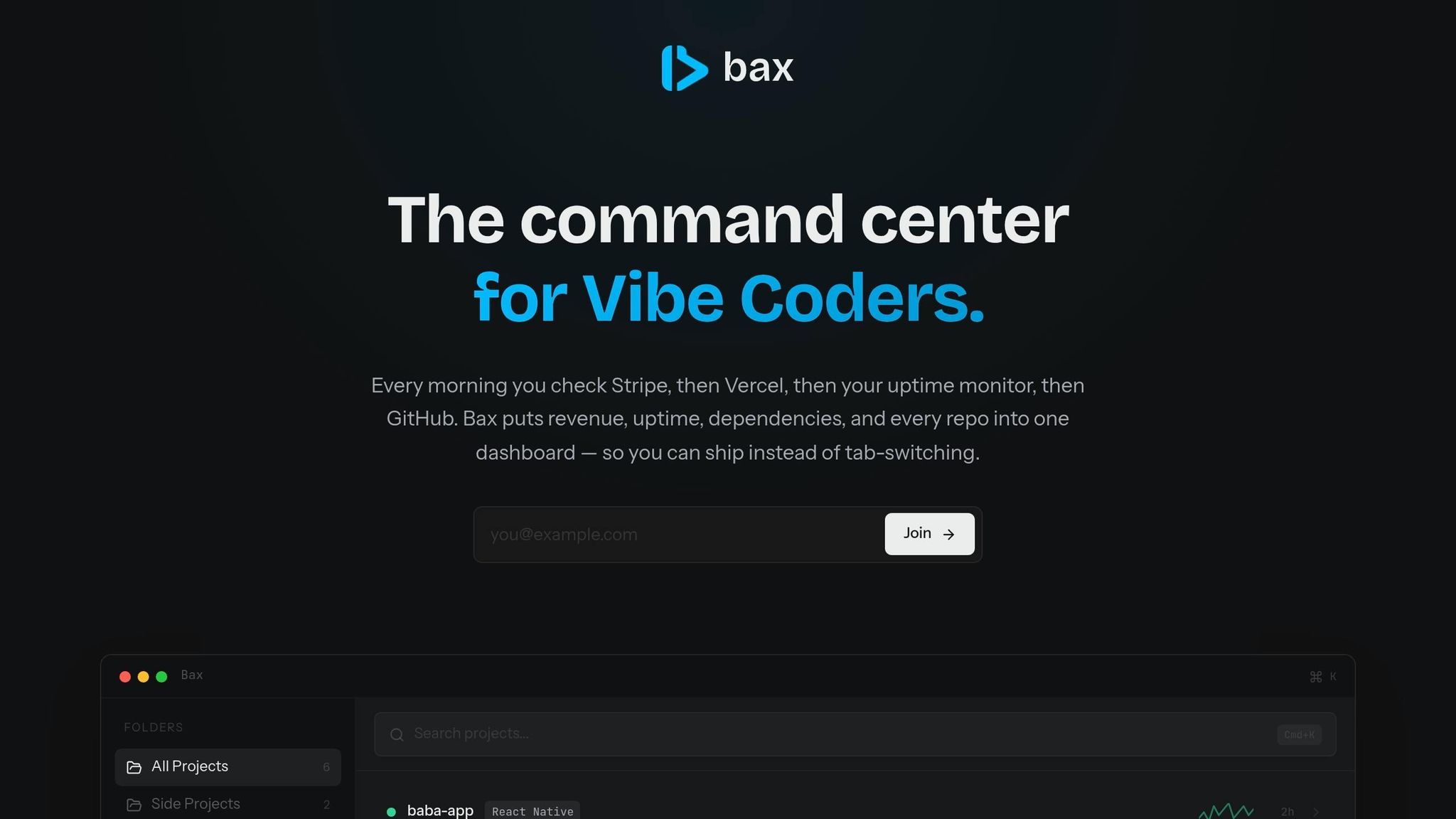
Bax steps in as a game-changer for indie developers dealing with the chaos of managing multiple dashboards. Switching between various tools and platforms can be a huge drain on productivity. Bax simplifies this by bringing everything together in one streamlined interface [29].
Features and Integrations
Bax offers a robust set of features designed to make life easier for developers. It connects seamlessly with GitHub for managing repositories and Stripe for tracking revenue metrics like MRR, ARR, churn, and LTV. It also includes uptime monitoring to keep tabs on service health. Impressively, it can automatically detect over 140 services in your codebase, such as Vercel, Netlify, Railway, Linear, Jira, PostHog, and Plausible.
With AI-powered repository analysis, Bax gives you valuable insights into your project structures and dependencies. And when it’s time to dive into the code, you can open your projects with a single click in tools like Cursor, VS Code, Zed, or Windsurf. A built-in developer news feed ensures you stay updated without leaving the dashboard, while weekly email digests summarize your key metrics. These features come together to create a tool that’s not just functional but also scalable to fit your needs.
Pricing Plans
| Plan | Price | Projects | AI Analyses | Uptime Endpoints | Key Features |
|---|---|---|---|---|---|
| Free | $0/month | Up to 5 | 3/month | 2 | Basic health badges, developer news feed |
| Pro | $12.99/month | Up to 25 | 25/month | 10 | Stripe revenue dashboard, dependency scanning, digest emails |
| Ultra | $19.99/month | Unlimited | Unlimited | 20 | In-depth dependency scanning, priority support |
The Free plan is perfect for developers trying out Bax, the Pro plan caters to indie developers managing multiple revenue streams, and the Ultra plan is ideal for those handling client work or running several SaaS projects.
How Bax Saves Time
Bax isn’t just affordable - it’s a huge time-saver. One of the biggest productivity killers for developers in 2026 is constant context-switching [7]. Bax tackles this with its Cmd+K palette, which lets you search across projects without jumping between multiple apps or menus. The AI-powered repository analysis and dependency scanning also cut down on manual work, making it easier to spot vulnerabilities or issues.
For developers managing multiple projects, Bax offers a single, unified space to handle everything. By reducing the need to hop between tools, Bax helps you stay focused and productive throughout your day.
Project Management and Documentation
Balancing tasks, client communication, and documentation across multiple platforms can be overwhelming. The right tools can simplify this process by reducing the need to constantly switch contexts, keeping your focus sharp and productivity high. By integrating task management, documentation, and support tools, you can streamline workflows and eliminate unnecessary friction.
Task Tracking Tools
Linear has emerged as a favorite among engineering-driven teams in 2026, powering over 25,000 product teams, ranging from startups to large enterprises [34]. Its standout features include a keyboard-first interface and an "optimistic UI" that eliminates loading delays, making issue management 2–3 times faster than traditional platforms [32].
"Linear is excellent. It has the right opinions for fast moving teams." - Kaz Nejatian, Opendoor [34]
Linear's approach, known as the Linear Method, emphasizes maintaining momentum rather than over-customization. It replaces lengthy Scrum practices with "Cycles", which automatically roll incomplete tasks forward, eliminating manual updates while keeping progress steady [32]. Its "Triage" system acts as a streamlined inbox for new issues, preventing backlogs from becoming unmanageable. The free tier allows up to 250 active issues with unlimited team members, while the Basic plan ($10/user/month) offers unlimited issues and history [31]. Pairing Linear with Bax provides a consolidated view of multiple projects, making it especially useful for indie developers managing several SaaS products [29].
For those who need a more versatile tool, Notion combines task management, CRM, and documentation into one platform [33]. The Plus plan ($10/month) enables unlimited file uploads and includes advanced AI tools capable of drafting detailed project wikis in minutes [33].
While task management tools help teams stay organized, effective documentation ensures clarity and reduces the need for repetitive customer support.
Documentation Tools
Investing in good documentation pays off - while it might take up just 20% of the overall effort, it can cut support tickets by as much as 40% [35]. GitBook is a leading choice for technical documentation in 2026, offering AI-powered search capabilities to quickly locate information within extensive content [35]. At $6.70/user/month, it features Markdown-native editing and seamless GitHub integration, ensuring documentation stays aligned with code changes [35].
For teams looking to simplify the creation of how-to guides, Scribe is a game-changer. It transforms one screen recording into a step-by-step guide, complete with automatic screenshots and annotations. Priced at $29/month for the Pro plan, Scribe can save hours of manual work and reduce support tickets by up to 30% [35].
For those who prioritize control of their data, BookStack offers a free, self-hosted solution. Its straightforward hierarchical "book" structure makes navigation easy for smaller teams [36].
Strong documentation doesn’t just improve internal workflows - it also minimizes customer support queries, creating a smoother experience for users.
Customer Support Options
When it comes to customer support, Crisp is a standout option for bootstrapped teams. It offers a free tier for up to two agents, while the Pro plan ($25/month) includes "MagicReply" AI [35]. For products with fewer than 1,000 users, Crisp's AI performs at about 90% of the efficiency of enterprise-level tools [35].
"The goal isn't zero tickets - it's zero frustrated users." - Riker, F³ Fund It [35]
For technical products, Plain is a 2026 newcomer designed to integrate deeply with tools like Linear and GitHub. It can automatically check existing issues before a bug report even reaches your inbox [35]. With an AI-powered customer support stack, you can automate 60–80% of tickets for under $200/month [35].
However, automation works best when paired with a solid understanding of your users’ pain points. It's recommended to personally handle at least 200 support tickets to identify recurring issues before implementing AI tools [35]. Once patterns emerge, you can connect your documentation to a smart help widget, which can deflect 40–60% of repetitive inquiries [35]. By integrating your support tools with project management and documentation platforms, you can create a seamless workflow that reduces dashboard switching and improves overall efficiency.
AI and Productivity Tools
AI tools are transforming workflows by handling complex tasks, allowing you to focus on strategic decisions. The secret lies in using the right specialized tools for different jobs instead of relying on a single solution. For instance, Claude.ai (Claude 3.5 Sonnet) shines in handling complex reasoning and architectural discussions. Its 200K token context window makes it ideal for analyzing entire codebases [5][38]. On the other hand, OpenAI Codex, bundled with ChatGPT Plus for $20/month, excels at producing high-quality code, offering rate limits about three times higher than its competitors [15].
"If you want it built fast, use Claude Code. If you want it built right, use Codex." - IndieRadar Team [15]
Solo founders are now investing $1,500–$2,000 per month in AI tool stacks, replacing what would have required an entire engineering team just a decade ago [8]. Tools like CodeRabbit, priced at $12/seat/month, automate pull request reviews, catching bugs that manual reviews might miss [8][38][39]. Meanwhile, Claude Code can shrink a four-hour refactoring session to just 45 minutes of supervised work [40].
AI Tools for Developers
Developers can streamline their workflows by assigning specific tools to particular tasks. Use Claude.ai for brainstorming and writing specs, v0 for UI generation, Claude Code for multi-file features, and Cursor for inline edits [5]. This approach prevents overburdening any single tool. Notably, 25% of Y Combinator's Winter 2025 batch built products with 95% AI-generated code [20].
For broader automation, OpenClaw, an open-source agentic tool, connects AI to messaging apps like WhatsApp and Telegram. It can manage email triage, customer support, and even tasks like flight check-ins [37].
"The solo operators building with these tools now are developing skills that will compound." - Manast [5]
On the marketing side, Orbator ($19/month) automates directory submissions and social media content specifically for indie hackers [39]. Agentic workflows are becoming popular, allowing AI tools to explore file systems, run terminal commands, and execute multi-step plans [5][15][40]. To keep these tools effective, maintaining a dedicated "specs" repository as a single source of truth can prevent context drift and architectural errors [8]. These tools are designed to integrate seamlessly, boosting productivity without overwhelming you with extra dashboards.
Time Tracking and Focus Tools
AI isn't just for coding - it can also help manage your time more effectively. Toggl Track remains a top choice for time tracking, offering a free tier for up to five users and paid plans starting at $10/user/month [41]. It combines manual timers with automatic background tracking for flexibility. For focus management, RescueTime is a solid option, though AI-based tracking might require occasional manual audits.
"AI time tracking creates more manual work for the user... From the first error you spot, you start investigating every AI time entry." - Yulia Miashkova, Content Creator, Memtime [42]
Integrating time tracking tools with calendars and project management platforms like Google Calendar or Linear can improve accuracy [41][43]. Advanced AI project tools can even analyze historical data to predict delays, budget overruns, and resource conflicts [43]. However, for indie developers managing multiple repositories, the bigger challenge often lies in reducing context switching between tools.
Bax AI Features
To address the clutter of too many dashboards, Bax embeds AI features directly into your workflow. Its AI-generated documentation tool automatically creates and updates project documentation from your codebase, much like Mintlify, but without requiring a separate platform [38]. The Pro plan ($12.99/month) includes up to 25 project analyses per month, offering insights across all repositories without switching contexts.
Bax also provides a developer news feed, keeping you updated on industry developments without extra browsing. By consolidating repository management, revenue tracking, uptime monitoring, and AI analysis in one place, Bax minimizes the need for constant tool-hopping. Its command palette (Cmd+K) gives instant access to any project, while one-click editor integration works seamlessly with Cursor, VS Code, Zed, and Windsurf - tools you're likely already using for development.
Conclusion
Building an effective tool stack in 2026 isn't about grabbing every tool you can find - it’s about picking the ones that help you work smarter and ship faster. The question has shifted from "Can I build this?" to "Should I build this?" AI coding assistants like Cursor and Claude Code now handle tasks that once required a team of 5–6 people, all from a single workstation [5][8]. On top of that, managed services like Vercel, Supabase, and Railway take care of operational burdens, letting you focus on what really matters - your product [1].
Your approach to tools and budgeting directly impacts your efficiency. The most savvy indie developers stick to one golden rule: scale on revenue, not hope. Start with a $0 MVP stack using free tiers, which can support up to 5,000 users and 50GB of bandwidth without costing you a dime. This lets you focus on testing your idea and reaching users instead of wasting time on unnecessary optimizations [2].
One often-overlooked hurdle is dashboard fragmentation. Bouncing between GitHub, Stripe, analytics tools, uptime monitors, and project management platforms eats up hours you could spend coding or talking to users. Tools like Bax solve this by consolidating key dashboards - covering everything from repositories to revenue and uptime tracking - all in one place. At just $12.99 per month for the Pro plan, Bax offers a huge return on investment by saving you hours of context-switching.
As one developer put it, “The best tool stack is the one you don’t think about. It should be invisible.” - be2942592, Developer. Tools should fade into the background, enabling you to jump straight into building. Focus on reliable infrastructure for payments and authentication, use AI to handle complex tasks, and choose platforms that unify your workflows to reduce mental fatigue. In 2026, the key to success isn’t perfecting every detail - it’s shipping consistently and getting your product in front of users.
The fastest path to validation is through streamlined tools and a clear focus. Set a 7-day deadline for your MVP [44] and get it in front of real users before worrying about extra features. Over-engineering is a common trap - 80% of indie hackers take over a month to ship their first MVP, often because they try to do too much [30]. The ones who succeed in 2026 will treat their tool stack as a way to amplify their efforts, not as a distraction.
FAQs
What’s the minimum tool stack to launch an MVP in 7 days?
To get an MVP off the ground in just 7 days, you'll need tools that prioritize speed and efficiency. Start with a modern frontend framework like Next.js, which pairs seamlessly with hosting platforms like Vercel for quick deployment. For your backend, consider a serverless database solution such as Supabase or Neon - these are designed to handle backend tasks without much setup hassle.
If payments are part of your MVP, Stripe is a reliable and easy-to-integrate option. To accelerate development further, leverage AI coding tools like Cursor, which can help streamline the coding process. Finally, platforms like Railway make hosting and deployment straightforward, saving you time and effort. Together, these tools can help you move from idea to launch in record time.
When should I upgrade from free tiers to paid plans?
When your project surpasses the boundaries of free plans or demands advanced capabilities, improved performance, or greater usage capacity, it might be time to consider upgrading to a paid plan. Before making the switch, evaluate whether the paid features will genuinely enhance your workflow and productivity enough to justify the cost.
How do I reduce dashboard switching across my tools?
To cut down on the hassle of constantly switching between dashboards, try centralizing your workflows with platforms that bring multiple tools into one interface. By 2026, many indie developers are turning to solutions like dFlow, which lets you handle services, databases, and code all within a single environment. Similarly, managed cloud platforms like Vercel and Railway make it possible to deploy various services from one interface. This approach not only minimizes context switching but also helps smooth out your development process.