Developer Context Switching: Why You're Losing 2 Hours a Day (And How to Fix It)
Context switching is costing you up to 2 hours of productive time every day. For developers, constantly shifting between tasks, tools, and projects disrupts focus, slows down progress, and increases errors. Here's why it happens and how to fix it:
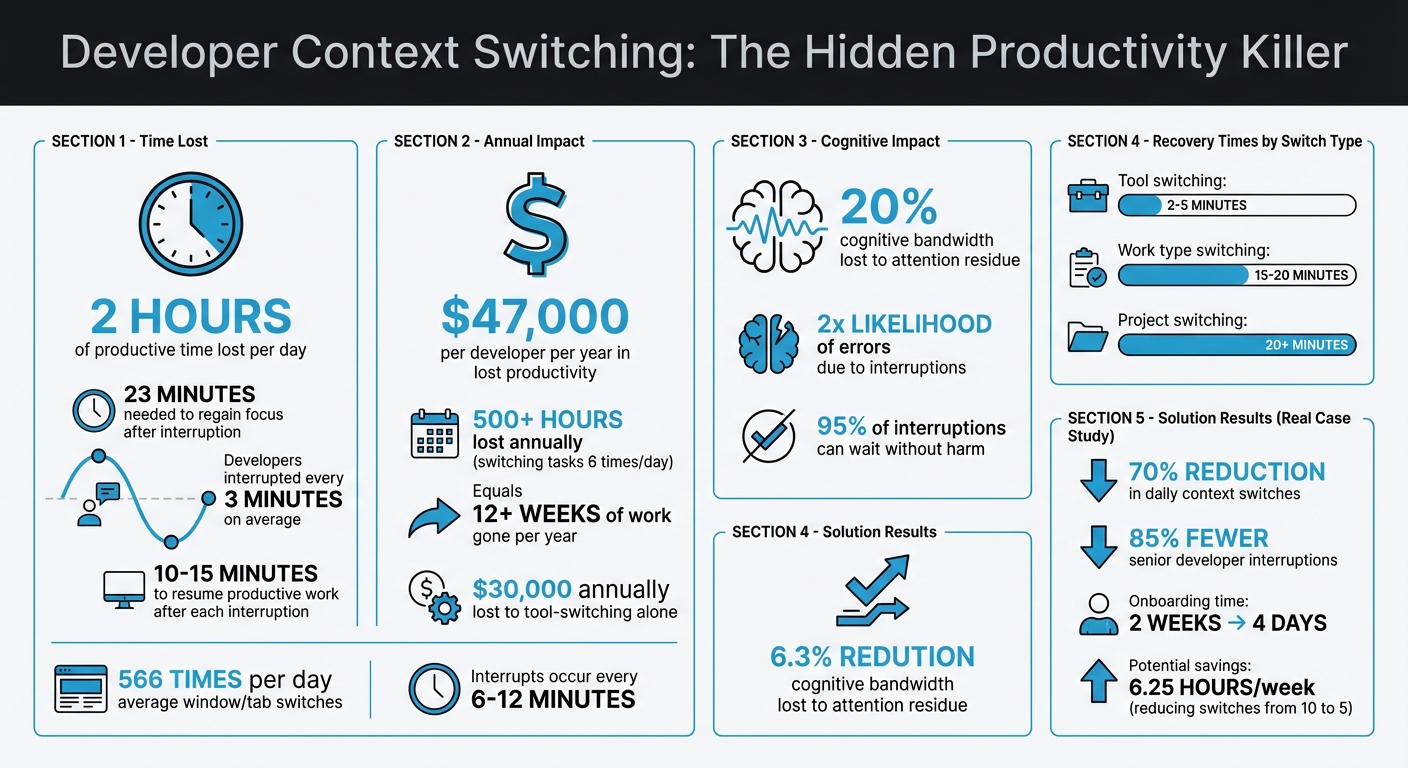
- It takes 23 minutes to regain focus after an interruption, but developers are interrupted every 3 minutes on average.
- Switching between tasks burns mental energy, leaving "attention residue" that reduces cognitive capacity.
- Tool overload, constant notifications, and juggling multiple responsibilities are key triggers.
- The result? Slower shipping, more mistakes, and mental fatigue.
Quick Solutions:
- Batch similar tasks into focused work blocks (e.g., dedicate mornings to coding).
- Limit work-in-progress tasks to avoid scattering your attention.
- Use unified dashboards to reduce the need for switching between tools.
- Turn off notifications and schedule specific times to check messages.
By implementing these strategies, you can reclaim lost time, improve focus, and ship code faster.
The True Cost of Developer Context Switching: Time and Money Lost
Why Developers Lose Flow - and How to Fix It
sbb-itb-5b9029c
How Context Switching Affects Developers
Context switching doesn’t just waste time - it takes a toll on your productivity, code quality, and mental well-being.
Lost Productivity and Slower Shipping
Every time you switch tasks, your brain has to unload and rebuild its mental model. For developers, this can be especially disruptive since you’re juggling database schemas, API contracts, business logic, and edge cases all at once. It’s like trying to keep multiple spinning plates in the air - only to have them crash when you’re forced to shift focus.
This fragmented attention delays releases. A developer who switches tasks just six times a day can lose over 500 hours annually - that’s more than 12 weeks of work gone [9]. Even worse, it takes 10–15 minutes to regain focus and resume productive work after each interruption [9].
The financial impact is staggering. Context switching can cost $47,000 per developer per year in lost productivity [11]. For indie developers or startups working against tight deadlines, this can mean missed launches and delayed entry into the market.
But the damage doesn’t stop at slower shipping. Constant interruptions can also lead to sloppy code.
More Errors and Lower Code Quality
Interruptions double the likelihood of errors. When residual attention from previous tasks lingers - what researchers call "attention residue" - it can sap up to 20% of your cognitive bandwidth [12]. For example, switching between debugging a database query and designing a UI component leaves part of your brain stuck on the last task.
This reduced focus can lead to missed details, especially when shifting between complex tasks like frontend development and infrastructure troubleshooting. When critical information slips through the cracks, technical debt piles up, and fixing those errors later becomes even more time-consuming.
Burnout and Mental Overload
Beyond productivity and code quality, the mental strain of constant switching can wear you down. Each switch forces your brain’s prefrontal cortex to deactivate one set of rules and activate another, consuming significant energy in the process [3][6]. Over time, this repeated effort depletes your brain’s glucose and ATP, leaving you mentally exhausted.
Studies show that frequent interruptions lead to higher cortisol levels in the afternoon [3]. This can trigger irritability, shallow problem-solving, and a sense of being "busy but unproductive." It’s the frustrating feeling of constantly spinning your wheels without making real progress - a phenomenon often called task-thrashing [8][6].
"Context switching isn't just an annoyance – it's a silent productivity killer. For developers, it means frustration, burnout, and the death of flow."
- Tiago Sampaio, Magento Commerce Expert [13]
Over time, constant interruptions can erode your ability to think deeply. When developers face interruptions every 6 to 12 minutes [7], it leaves little space for the kind of sustained focus that sparks creative solutions. Instead, the result is often predictable, uninspired code that lacks innovation.
What Causes Context Switching for Indie Developers
After understanding how context switching affects productivity, it’s time to dig into what triggers it. For indie developers and solopreneurs, the issue often isn’t about being disorganized - it’s about juggling every role yourself. You’re not just coding; you’re managing products, handling support, and even troubleshooting your own infrastructure.
Scattered Dashboards and Tools
Being a solo developer means relying on a variety of tools to keep things running. You’re coding in VS Code, tracking versions on GitHub, hosting on platforms like Vercel or Fly, managing billing through Stripe, monitoring errors with Sentry, and keeping an eye on analytics dashboards. Each tool has its own interface, login, and workflow, forcing your brain to constantly shift gears and rebuild focus [14].
This constant switching adds up. On average, knowledge workers flip between windows and tabs 566 times a day [10]. For developers, tool-switching ranks as the third biggest productivity killer in 2025 [1]. And the financial impact? A staggering $30,000 per developer annually in lost productivity [1].
The problem doesn’t stop there. Many indie developers also deal with “shadow DevOps” tasks - manual scripts and automations that eat into your coding time [14]. Combine this with the chaos of constant notifications, and your focus takes a major hit.
Alerts and Notifications
Notifications are designed to grab your attention, and they do it well. Whether it’s a Slack message, a Stripe payment issue, a production alert, or a bug report, these interruptions pull you away from your work [14]. Even the temptation to quickly check if a build has finished or if a customer has replied on Slack can derail your focus [17, 9].
On average, developers face interruptions every 3 minutes [10]. And recovering from each one isn’t quick - it takes 10 to 15 minutes to get back into the flow of editing code [9]. What’s worse? Most of these interruptions aren’t urgent. In fact, 95% of the time, there’s no real harm in delaying your response [9].
Unplanned Schedules and Task Switching
Beyond tool overload and notifications, unpredictable schedules are another major disruptor. Without a team to help manage interruptions, every unplanned meeting, unclear task, or last-minute request lands squarely on your plate [14]. If your calendar is packed with short gaps between interruptions, it’s nearly impossible to find the 30 to 40 minutes you need for deep, focused work [12, 7].
Writing code requires holding complex mental models in your head - logic flows, data structures, API contracts, and edge cases all need to fit together. When an interruption forces you to shift focus, that mental model collapses [5]. Recovery times vary depending on the type of switch: jumping between tools can cost 2–5 minutes, switching work types takes 15–20 minutes, and moving between unrelated projects can eat up over 20 minutes [5, 3].
"Your body is at your desk, but your mind is fragmented."
- Sophie Leroy, Business School Professor, University of Washington [5]
Without a structured approach to managing these disruptions, you can end up feeling busy but not productive - spending your energy on reactive tasks instead of meaningful progress. These interruptions make it harder to apply focus-saving strategies like task batching, leaving you stuck in a cycle of constant context switching.
How to Reduce Context Switching
Losing up to two hours daily to context switching is a challenge, but there are practical ways to streamline your workflow and reclaim that time.
Task Batching and Focused Work Blocks
Organizing your tasks into similar groups can help you stay in the zone. For example, set aside specific blocks of time for deep, analytical work (like coding or designing system architecture) and separate blocks for handling emails, Slack messages, or other administrative tasks [15][16].
Mornings are often the best time for deep work since mental performance tends to peak early in the day [7]. Use the first three to four hours to tackle complex tasks, working in 90-minute intervals followed by a short break. This rhythm aligns with your brain's natural cycles and prevents burnout from shorter, fragmented work periods [15][2].
To minimize interruptions, establish fixed times to check emails and messages, such as 9:00 AM, 12:00 PM, and 4:00 PM. Outside of those times, close communication apps entirely. Research shows that 95% of messages can wait a couple of hours without causing issues [9][15]. Before diving into a deep work session, take a few minutes to close unnecessary browser tabs, log out of Slack, and put your phone out of reach [15].
"Deep, focused work is like maintaining momentum on a highway. Every context switch is a red light - you don't just lose speed, you burn extra fuel to accelerate again." - Asrify [4]
This method of grouping tasks and focusing deeply works hand-in-hand with managing the number of active tasks on your plate.
Set Work-in-Progress (WIP) Limits
Keeping your active tasks to just one or two at a time can significantly reduce "attention residue" - the mental clutter left behind when switching between unfinished tasks [8][16][2][7]. When you juggle too many projects at once, your focus gets scattered. Instead, fully complete one or two tasks before moving on to the next. This isn't about slowing down; it's about maintaining momentum to finish tasks faster.
For developers, using separate Git branches for different features or bug fixes can help create clear mental boundaries, avoiding the chaos of trying to manage everything in one workspace [8].
This approach to limiting tasks pairs well with tools that minimize the need for constant switching between platforms.
Use a Unified Dashboard to Eliminate Tool-Switching
Jumping between tools can sap your energy and focus. Consolidating everything - repositories, revenue analytics, monitoring, and dependency scanning - into one dashboard can save time and reduce distractions [5]. Tools like Bax simplify this process by integrating data from platforms like Stripe (for MRR, ARR, and churn), uptime monitoring, and even dependency scanning into a single interface. Features like a command palette for quick project access and seamless integration with popular code editors make it easier to stay on task without flipping through tabs.
For example, some engineering teams have saved hours each week by incorporating pull request workflows into a unified dashboard [17].
Fewer tools mean fewer distractions, allowing you to spend more time coding and less time navigating between platforms.
How to Track Your Progress
To see if your new workflows are hitting the mark, keep an eye on key metrics that reveal their impact on productivity and focus.
Metrics to Monitor
By reducing context switching with techniques like task batching and using unified dashboards, you can reclaim valuable time. Start by monitoring deployment frequency and lead time for changes - these metrics show whether your improved focus is helping you ship code faster and more consistently. Another useful metric is your work-in-progress (WIP), which you can track by counting open pull requests. Aim for 1–2 open PRs per developer to minimize mental overload and encourage finishing one task before jumping to the next [11].
Keep PR sizes manageable - between 200–400 lines. This not only speeds up code reviews but also reduces idle time [17]. Additionally, track code review turnaround time - quicker reviews mean fewer interruptions and a smoother workflow.
Here’s a real-world example: Between September and November 2025, an eight-person startup using Syncally cut daily context switches by 70%, reduced senior developer interruptions by 85%, and shortened onboarding for new hires from two weeks to just four days [1].
Another critical metric is flow efficiency, which measures active work time versus idle time. If this ratio is low, it’s a sign that too much time is being spent waiting, increasing the risk of disruptive context switches [18]. Lastly, monitor defect rates - fewer bugs often indicate that your team is maintaining better focus and mental models without constant interruptions [18].
These metrics can help you pinpoint bottlenecks and guide adjustments to your workflows.
Make Small Adjustments Based on Results
Once you’ve established baseline metrics, use them to fine-tune your approach. Start by tracking your time for a typical week to see how often you switch tools or experience fragmented work hours [1][4]. This baseline gives you a clear picture of where you stand.
After introducing changes like task batching or setting WIP limits, review your metrics weekly. For example, if deployment frequency slows down, investigate bottlenecks - your PR review process might need its own batching system. If defect rates stay high, consider extending uninterrupted work blocks for deeper focus.
The key is to make small, data-driven adjustments each week, refining your workflows step by step.
Conclusion
Constantly jumping between tasks disrupts your workflow and drains productivity. Studies show that context switching can cost you up to 2 hours every day, with your brain needing an average of 23 minutes just to regain focus after each switch [9][1]. For developers, this isn’t just a minor inconvenience - it can translate to over $15,000 in lost time annually [1].
To combat this, implement strategies like task batching and setting work-in-progress (WIP) limits. These approaches help reduce attention residue and allow you to complete tasks faster. Tools that consolidate multiple services into a single dashboard, such as GitHub, Stripe analytics, and uptime monitoring, can significantly cut down on tool-switching. Solutions like Bax are built precisely for this purpose, keeping your mental flow intact and minimizing disruptions.
Try tracking your context switches for a week, schedule 90-minute focus blocks with notifications off, and batch your communications. Even cutting daily switches from 10 to 5 can save you 6.25 hours each week [2].
The key to shipping faster isn’t working longer hours - it’s safeguarding your focus. Start applying these techniques now, and you’ll spend less time juggling tasks and more time creating exceptional software.
FAQs
How do I measure my own context switching?
To get a handle on context switching, start by tracking interruptions and task changes. Time-tracking tools or surveys can help you monitor how often you switch tasks and how much time it takes. Research indicates that frequent interruptions - every 6 to 12 minutes - can eat up as much as 23 minutes of productivity as you refocus.
For more technical insights, system tools like vmstat can measure context switch times. However, these are more suited for system-level data and might not be as practical for understanding everyday workflows.
What counts as a “WIP limit” for a solo developer?
A “WIP limit” for a solo developer refers to the maximum number of tasks or work-in-progress items they should actively juggle at any given time. By keeping this number low, it becomes easier to stay focused, minimize context switching, and avoid feeling overwhelmed. This approach is a practical way to boost productivity and manage multiple projects more effectively.
How can I reduce tool-switching without changing my whole stack?
To cut down on constant tool-switching without revamping your entire setup, consider following the 3-Tool Rule. This approach involves sticking to just three primary tools - such as your IDE, task manager, and communication platform - while consolidating or simplifying the rest.
You can also group similar tasks together and take advantage of integrations or features like notifications to keep things running smoothly. These small adjustments can ease mental strain and help you stay focused, all without the need for a major overhaul of your tools.