Dependency Vulnerabilities Are Killing Side Projects - How to Scan All Your Repos at Once
Your side projects might be at risk due to hidden vulnerabilities in third-party dependencies. With most JavaScript and Python projects relying on hundreds of external packages, unpatched vulnerabilities can expose your projects to attacks like the Shai-Hulud incident, which impacted over 20 million downloads in late 2025. Managing these risks manually is overwhelming, especially if you have multiple repositories, leading to alert fatigue and missed issues.
Here’s how to protect your projects:
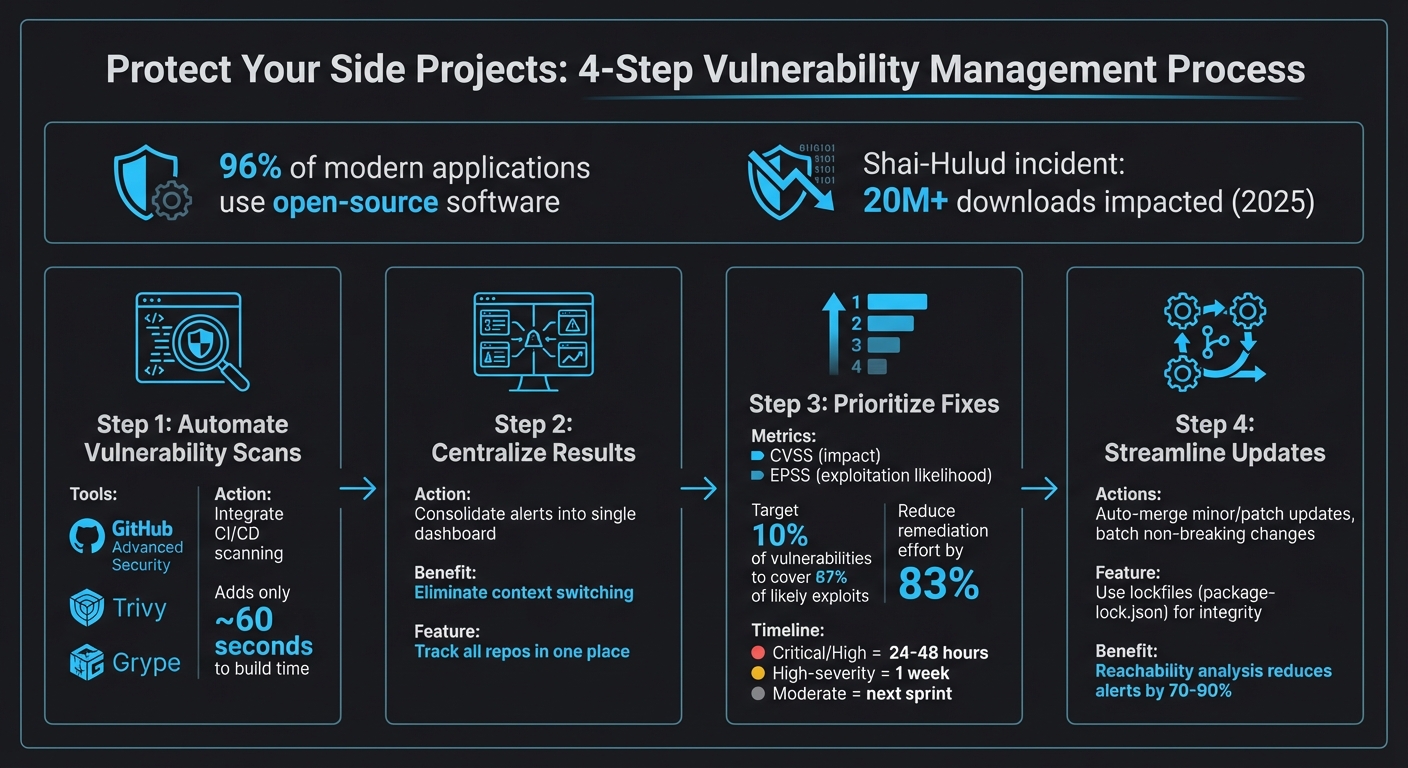
- Automate vulnerability scans: Use tools like GitHub Advanced Security or CI/CD integrations (e.g., Trivy, Grype) to catch issues early.
- Centralize results: Consolidate alerts into a unified dashboard to track vulnerabilities across all repos.
- Prioritize fixes: Focus on critical vulnerabilities first, using tools like CVSS and EPSS to rank risks.
- Streamline updates: Automate dependency updates and batch non-breaking changes to reduce disruptions.
4-Step Process to Scan and Secure All Your Repositories from Dependency Vulnerabilities
Tutorial: Indentifying and mitigating vulnerabilities in your application stack
sbb-itb-5b9029c
The Problem with Managing Dependencies Across Multiple Repositories
Handling dependencies across multiple repositories can quickly become overwhelming, especially for solo developers. Each repository comes with its own configuration file - like package.json, requirements.txt, or go.mod - making it tough to keep track of everything. Without automation, monitoring vulnerabilities across all these files becomes nearly impossible, leaving your projects vulnerable and slowing down your development process.
Why Manual Scanning Doesn't Work
Manually running tools like npm audit or pip check for each repository is a tedious and error-prone process. It also delays the discovery of vulnerabilities. As Zack Koppert from GitHub's OSPO explains:
Manual updates can be time-consuming and error-prone. [4]
Imagine a vulnerability is disclosed on a Monday, but you only detect it by Friday - or even later. By then, it’s often buried under other changes, making it harder to address. AppSec expert Suphi Cankurt highlights this issue:
it is buried under other changes and fixing it takes longer. [3]
Manual scanning also results in fragmented insights. You might know that one repository has critical vulnerabilities and another has a few more, but without a centralized system, it's tough to see the bigger picture. For instance, how can you quickly identify if the same vulnerable library is being used across multiple projects? Trying to spot these patterns manually is repetitive, inefficient, and easily leads to mistakes.
The Productivity Cost of Context Switching
The real drain on your productivity comes from constant context switching. Jumping between repositories, security dashboards, and package managers disrupts your focus and slows you down. Every time you switch tools, you lose momentum, making it harder to stay on top of your work.
On top of that, alert fatigue adds another layer of complexity. Each repository generates its own stream of security pull requests and notifications, flooding you with information. Critical vulnerabilities can easily get lost in the noise. Without a consolidated view, you’re forced to repeatedly verify issues across projects, increasing the chances of missing something important while leaving your side projects exposed.
How to Scan All Your Repositories at Once
Managing vulnerabilities across multiple repositories can be overwhelming, especially if you're relying on manual scans. Automating this process not only saves time but also ensures that critical issues don't slip through the cracks. Here's how you can streamline multi-repo scanning and improve your vulnerability management.
Set Up GitHub Advanced Security for Dependency Alerts
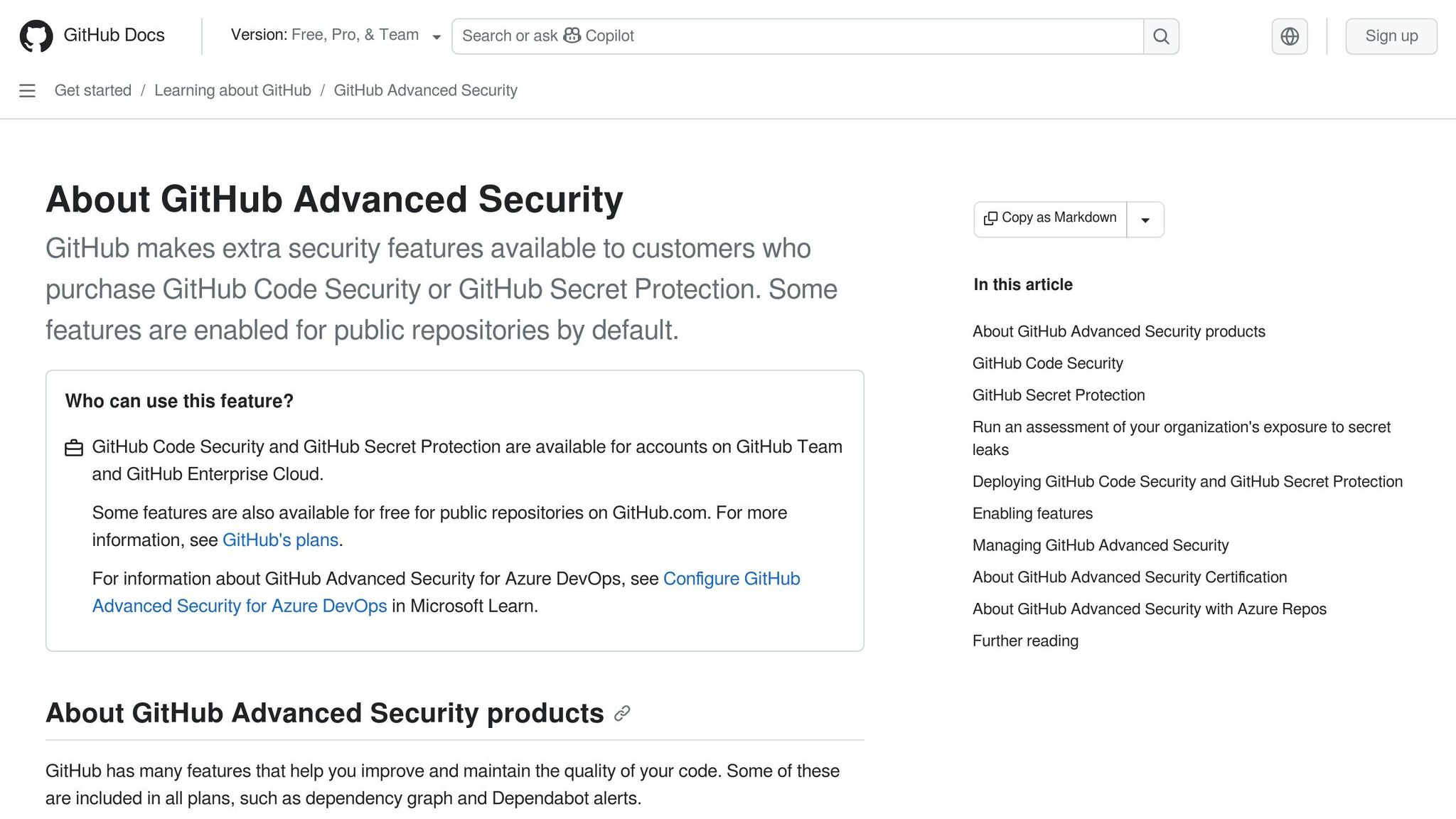
GitHub provides built-in security tools to help you track vulnerabilities effectively. For public repositories, you can access free features like code scanning, secret scanning, and dependency reviews. However, if you're working with private repositories, you'll need a GitHub Advanced Security (GHAS) license to unlock these capabilities.
To get started, use the "Default Setup" for CodeQL. This configuration automatically scans every push and pull request, eliminating the need for manual setup. The Security Overview dashboard in GitHub is your go-to spot for monitoring your security status, tracking alert trends, and reviewing coverage. For more advanced control, you can choose from different CodeQL query suites:
- Default Suite: Focuses on core security queries with minimal false positives.
- Security-Extended Suite: Offers broader checks for more comprehensive coverage.
- Security-and-Quality Suite: Includes both security checks and code quality assessments [7].
Automate Scans with CI/CD Pipelines
Once you've automated detection, take it a step further by integrating vulnerability scans directly into your CI/CD workflows. This ensures that issues are caught early - before they merge into your main branch. Adding Software Composition Analysis (SCA) to your pipelines is a great way to identify vulnerabilities in third-party dependencies.
When setting up your CI/CD jobs, configure them to output scan results in a standardized format. This makes it easier to aggregate data across multiple repositories. Open-source tools like Trivy and Grype work seamlessly with platforms like GitHub Actions and GitLab CI/CD, making them excellent choices for this task.
To avoid overwhelming your team, start by setting your pipeline to fail builds only on CRITICAL or HIGH vulnerabilities. As AppSec expert Suphi Cankurt points out:
If developers learn to ignore SCA results, the tool becomes useless.
Some advanced tools even offer reachability analysis, which can reduce actionable alerts by 70% to 90%. This feature filters out vulnerabilities in code paths that your application never actually uses, helping your team focus on what's truly important [6].
Use a Unified Dashboard to Track All Vulnerabilities
After automating scans, the next step is to centralize your results. A unified dashboard brings together data from GitHub security tools, CI/CD logs, and other sources, giving you a complete view of your security posture. This approach minimizes the risk of missing critical issues.
With a unified dashboard, you can monitor vulnerability data, dependency health, and security alerts all in one place. Tools like Bax allow you to aggregate scanning results alongside other key metrics, such as repository management and uptime monitoring. To prevent alert fatigue, configure your dashboard to display only high-severity findings initially. If you notice that your false positive rate exceeds 20–30%, it may be time to revisit your tool configuration [6].
How to Prioritize and Fix Vulnerabilities
After spotting vulnerabilities in your repositories, the next step is prioritizing which ones to fix first. Not all vulnerabilities are created equal, and treating them as such wastes time and resources. Instead, focus on the most critical risks using severity rankings and automation to streamline the process.
Rank Vulnerabilities by Severity
To effectively rank vulnerabilities, consider both their potential impact and the likelihood of exploitation. The Common Vulnerability Scoring System (CVSS) helps measure the possible damage, while the Exploit Prediction Scoring System (EPSS) estimates the chances of real-world exploitation. According to the Cyentia EPSS study, targeting just 10% of vulnerabilities could cover 87% of those likely to be exploited [5]. This approach could cut remediation efforts by 83% compared to relying solely on CVSS scores [5].
Configuring your tools to focus on high-priority issues can make a big difference. For instance, you can set npm audit --audit-level=high to flag only high and critical vulnerabilities, reducing distractions caused by low-risk alerts [1]. Aim to patch high and critical vulnerabilities within 24–48 hours, ensuring high-severity issues are resolved within a week. Moderate vulnerabilities can be addressed in your next sprint cycle [1]. Auto-triage rules are another way to streamline this process, helping you dismiss false positives or defer issues until fixes are available [5].
Once you've established your priorities, automation can help you handle these vulnerabilities quickly and efficiently.
Automate Dependency Updates
Manually updating dependencies, especially for side projects, is time-consuming and inefficient. Automating updates for minor and patch versions of stable packages can save significant effort. Use auto-merge tools to apply these updates, ensuring they pass all CI tests before deployment [8][1]. Timing matters too - scheduling updates for Monday mornings allows you to monitor any issues that arise [8][1].
Batching updates is another smart way to reduce disruptions. Instead of testing dozens of pull requests individually, group non-breaking updates into a single feature branch. This approach simplifies validation and minimizes interruptions. Lockfiles like package-lock.json are essential for maintaining exact package versions and protecting against supply chain attacks by including integrity checksums [1]. As software engineer James Ross Jr. wisely notes:
Every package in your node_modules directory is code you did not write and code you are responsible for [1].
To keep track of your dependencies and vulnerabilities, tools like Bax can be a game-changer. Bax consolidates dependency health and other metrics into one dashboard, eliminating the need to juggle multiple tools just to stay on top of your vulnerability management.
Conclusion: Protect Your Side Projects from Dependency Vulnerabilities
Using automated, centralized scanning can help ensure dependency vulnerabilities don’t derail your side projects. By integrating this scanning process into your CI/CD pipeline, you only add about 60 seconds to your build time[3]. This small step significantly reduces the time needed to address issues.
With 96% of modern applications relying on open-source software[5], manually tracking dependencies just isn’t practical. Instead, pairing automated updates with smart prioritization - focusing on the 10% of vulnerabilities most likely to be exploited - can cut remediation efforts by 83%[5].
These stats highlight the value of taking a proactive and automated approach.
Building reliable software is not just about writing new code - it's also about maintaining and securing what already exists. - Shashi Bhushan Kumar, Full-Stack Developer[2]
Make it a priority to patch high-critical vulnerabilities quickly[1]. Leverage reachability analysis to filter out unnecessary alerts, reducing actionable notifications by 70–90%[3]. Rather than juggling multiple tools to monitor dependency health, uptime, and repository metrics, consider consolidating everything into a single dashboard like Bax. This eliminates context switching and keeps you focused on delivering results.
FAQs
What’s the fastest way to scan all my repos without setting up each one manually?
The quickest approach is leveraging tools designed for multi-repository scanning with minimal effort. Take GitHub, for instance - it offers features like Dependabot, which can be enabled across your entire organization. This automatically scans all repositories for vulnerabilities. Additionally, you can turn on security alerts and auto pull requests in your repository settings. This way, you simplify dependency management without the hassle of configuring each repository one by one.
How do I decide which dependency vulnerabilities actually need fixing first?
When addressing vulnerabilities, focus on those with the highest severity - such as those marked with high or critical CVSS scores - and their exploitability. Start by tackling issues that affect production dependencies, as these pose a more immediate risk compared to development dependencies.
To streamline this process, tools like reachability analysis can help you identify which vulnerabilities are genuinely exploitable, cutting through false positives. By concentrating on the most critical and easily exploitable vulnerabilities first, you can enhance security while using your resources efficiently.
How can I reduce noisy alerts and false positives across multiple projects?
To keep noisy alerts under control, set up dependency tools to bundle updates on a monthly or quarterly schedule. Focus on addressing high-severity vulnerabilities first to tackle the most critical issues. Organize alerts by severity to make triage more efficient, and use commands like @dependabot close or @dependabot merge to handle them quickly. You can also group updates across ecosystems, which simplifies management and reduces the number of alerts you need to process. Additionally, automated security tools can help zero in on the most pressing issues, keeping your alert workload manageable while strengthening overall security.